


One magic link. Your customer records. You watch it right in the ticket.
Send customers a secure Magic Link — they record in their browser with no app or account needed, and the video lands as an inline player in your ticket automatically. Reply with audio or video from inside the Freshdesk sidebar. No tab switching. No external tools.
21-day free trial · No credit card required
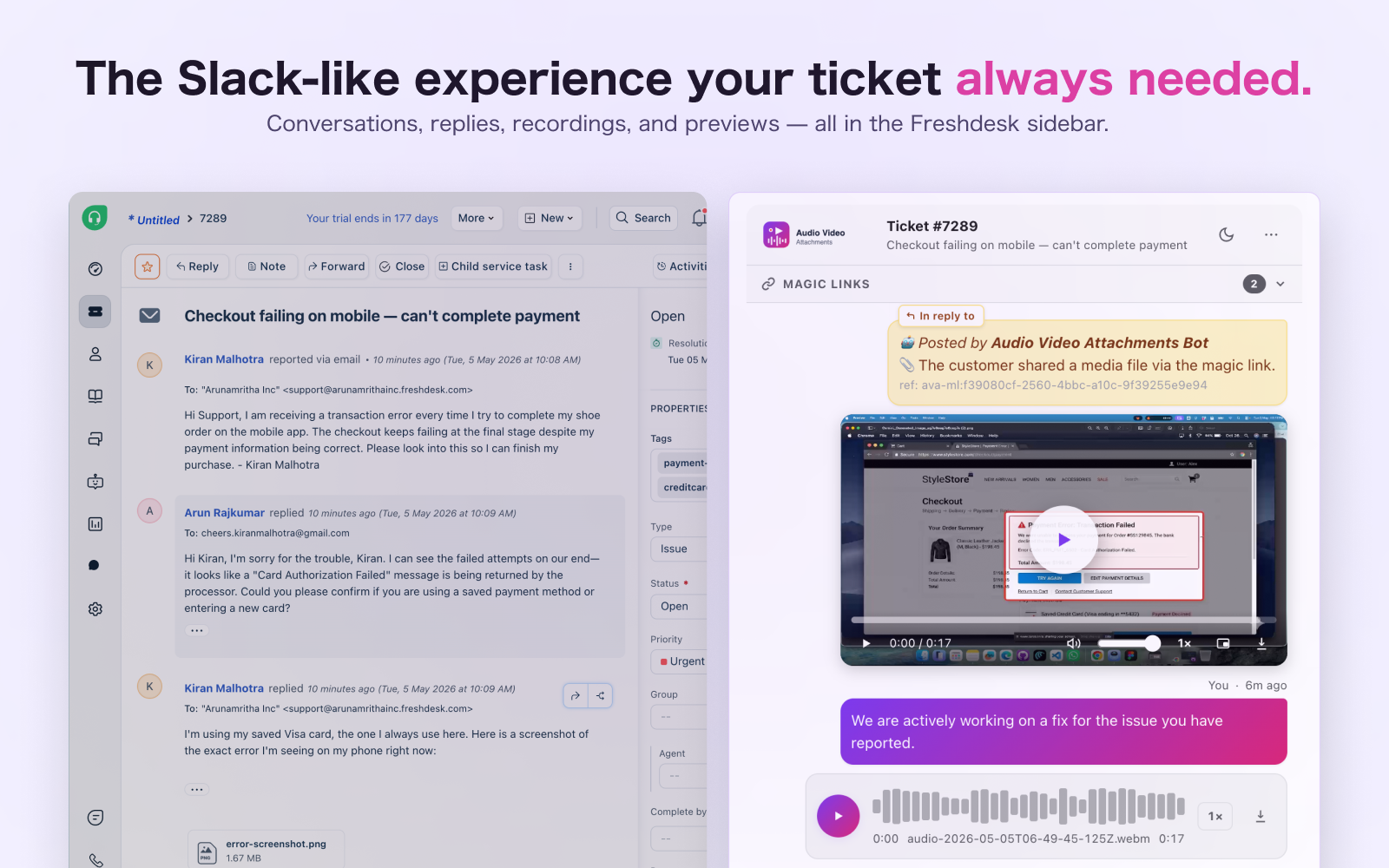
Three steps. Customer shows you the problem.
The entire Magic Links flow — from your click to the player in your ticket — takes less than two minutes.
You send the link
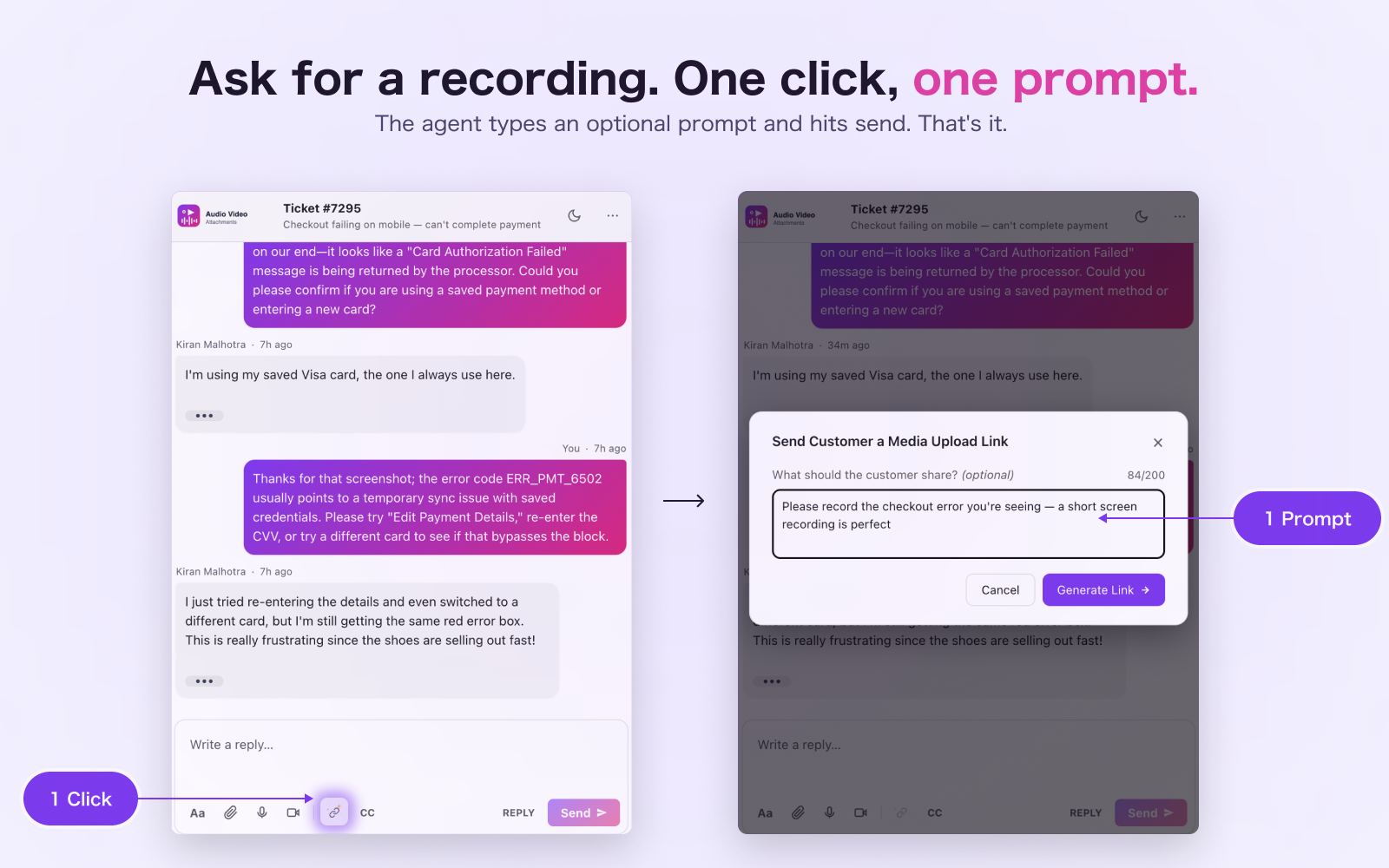
Click the magic link icon in the composer. Type a context prompt — or skip it. Hit Generate. AVA writes the reply for you and inserts the secure link. You review it and send.
Customer records in their browser
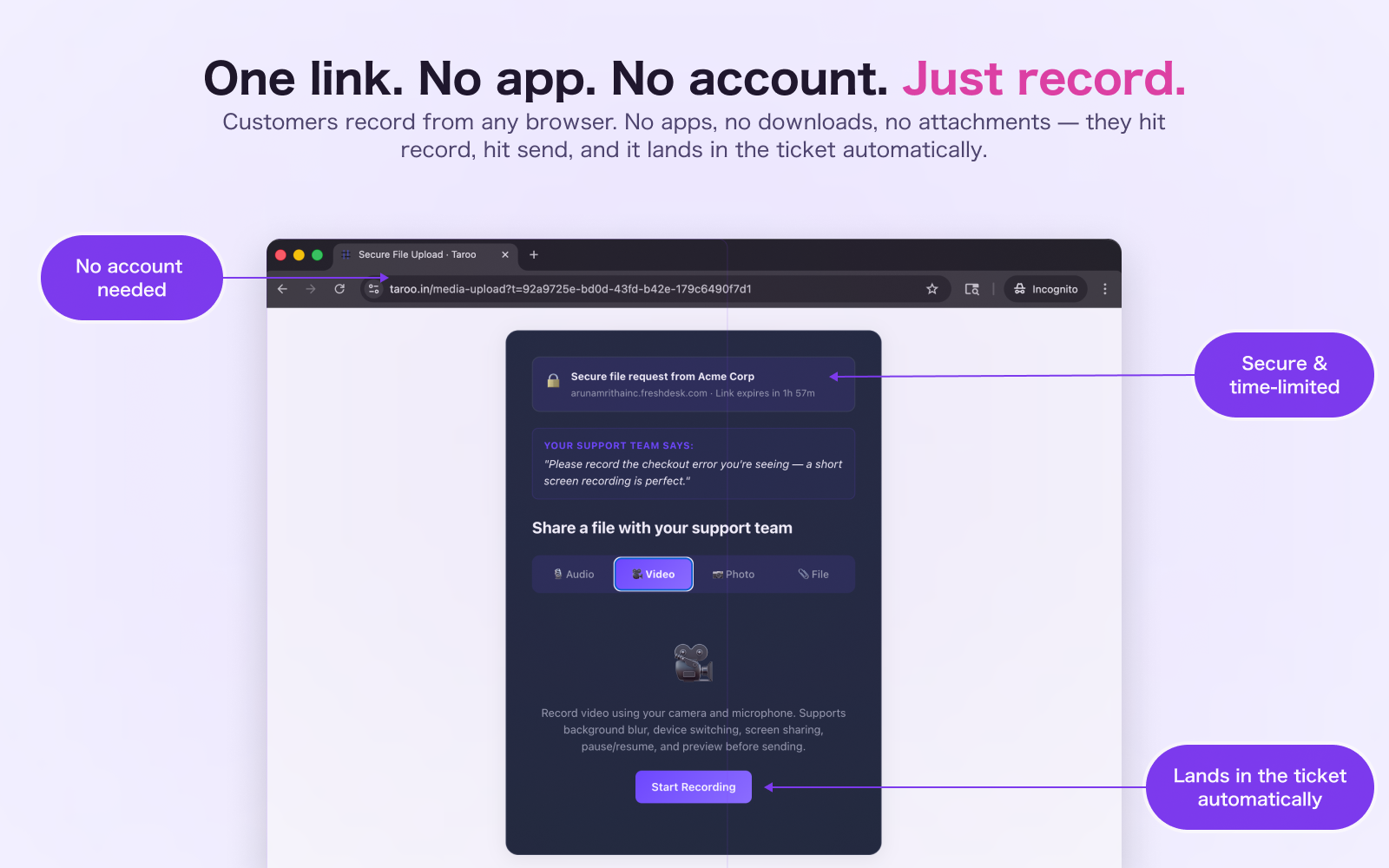
They open the link — any browser, any device. No app, no account, no download. They see your prompt, pick Audio, Video, or File, hit record, hit send. That's it.
Player lands in the ticket
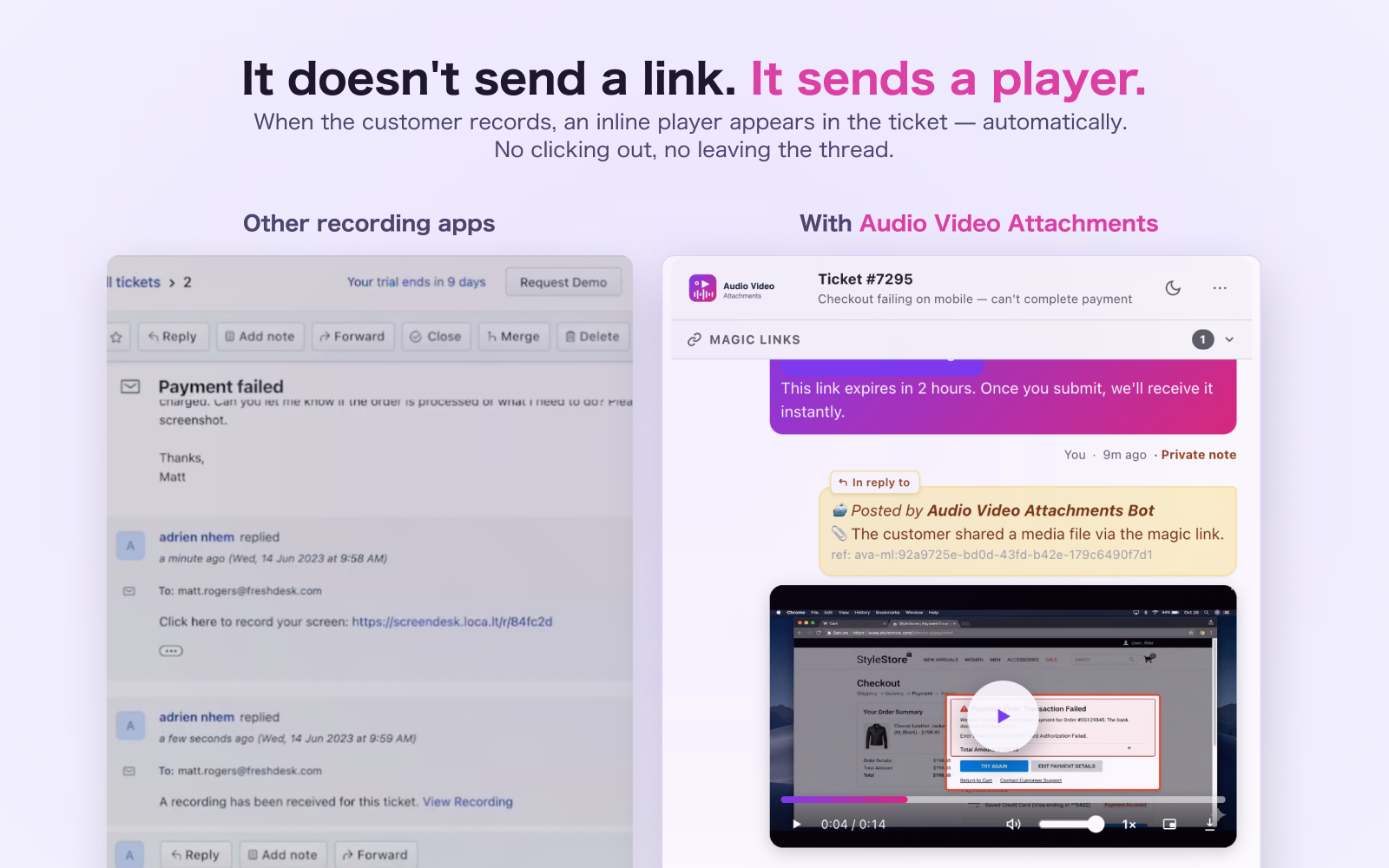
The recording arrives as a private bot note with a full inline player. Scrubber, speed control, Picture-in-Picture. Watch it right in the thread — without leaving Freshdesk.
Stop asking customers to describe the problem
- "Can you describe what's happening?" — customers try, but words don't capture a broken UI
- Customers attach screen recordings via email — you download, open a new app, play, switch back
- Recording a reply means leaving Freshdesk: open Loom, record, copy link, paste it in
- Freshdesk's default reply list shows attachments as grey links — no inline players
- Every agent replies through the admin account — no attribution, no accountability
- Send a Magic Link in one click — the customer records in their browser, no app or download required
- The recording lands as an inline video player in the ticket automatically — watch it without leaving Freshdesk
- Record a voice or video reply from inside the sidebar — it appears as a player in the thread instantly
- Every attachment from every reply plays inline — audio waveform, video scrubber, image lightbox, PDF preview
- UBAC: each agent replies with their own API token — customers see who they're talking to
Everything you need
Built for real support team workflows. Every feature designed for speed and clarity.
Ask for a recording. One click, one prompt.
Hit the magic link icon in the composer. Type what you need — "Please record the checkout error you're seeing" — and click Generate. AVA sends the customer a secure, time-limited link. They open it in their browser, hit record, hit send. The recording arrives in the ticket as an inline player. No email attachment. No external app. No instructions.
No app. No account. Just their browser.
The customer sees a secure trust header — your company name, your Freshdesk domain, and a countdown timer. Below it, your prompt in their words. They tap Audio, Video, or File, hit record, and it's done. Works on any phone or laptop. No login, no download, no instructions to write.
It doesn't send a link. It sends a player.
Competing tools send an email with a "View Recording" hyperlink. You click it, leave Freshdesk, watch it on their site, come back, copy notes. AVA does something different: the recording lands as a private bot note with a full inline video player. Scrubber, playhead, speed control, Picture-in-Picture, download — right in the ticket thread. You never leave.
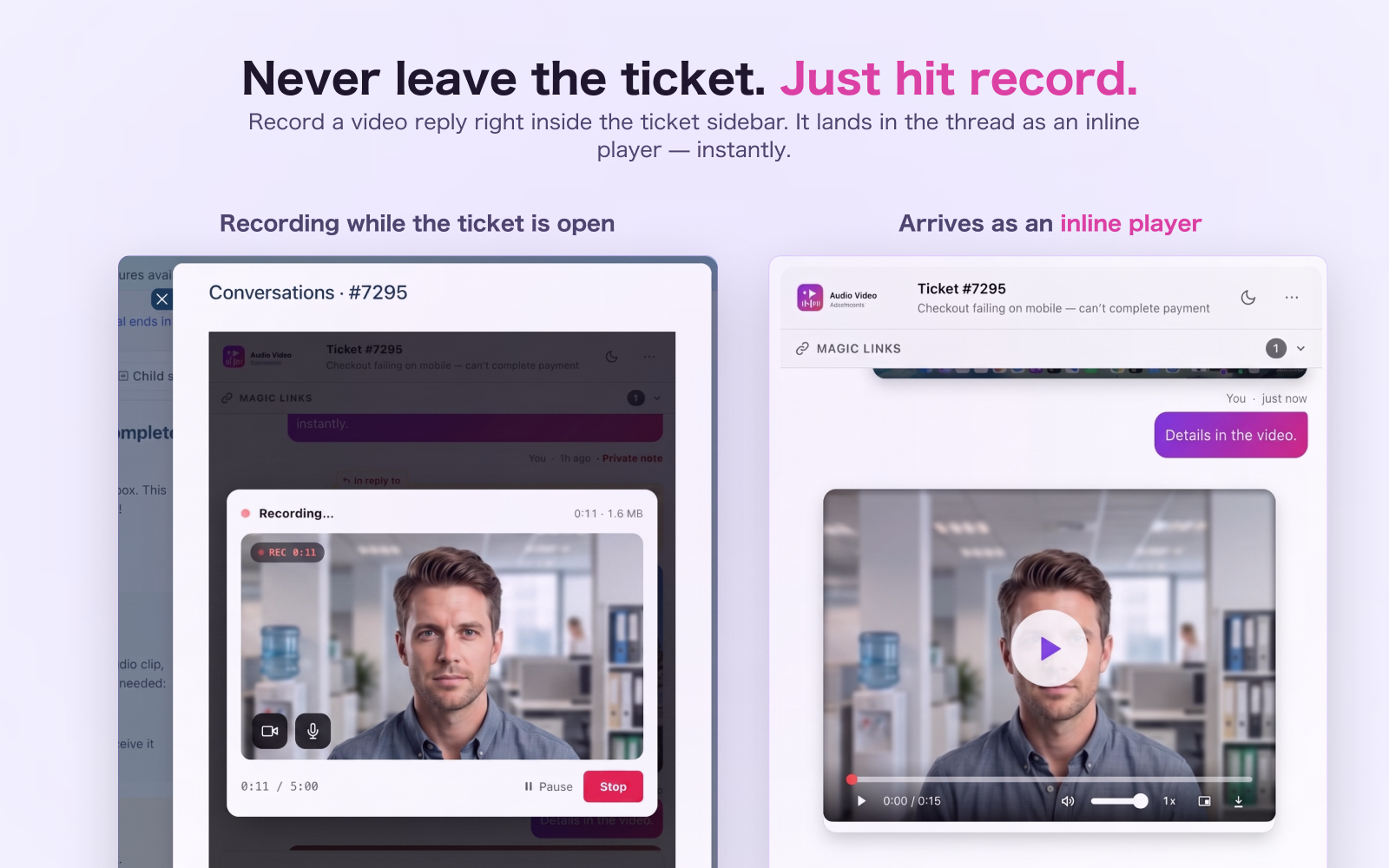
Never leave the ticket. Just hit record.
Click the camera icon in the composer while the ticket is open in front of you. Record your walkthrough, your fix, your explanation. When you stop, the video attaches to the reply and the customer receives a player — not a link — in their inbox. Same for audio. No Loom, no screen-share tool, no tab switching.
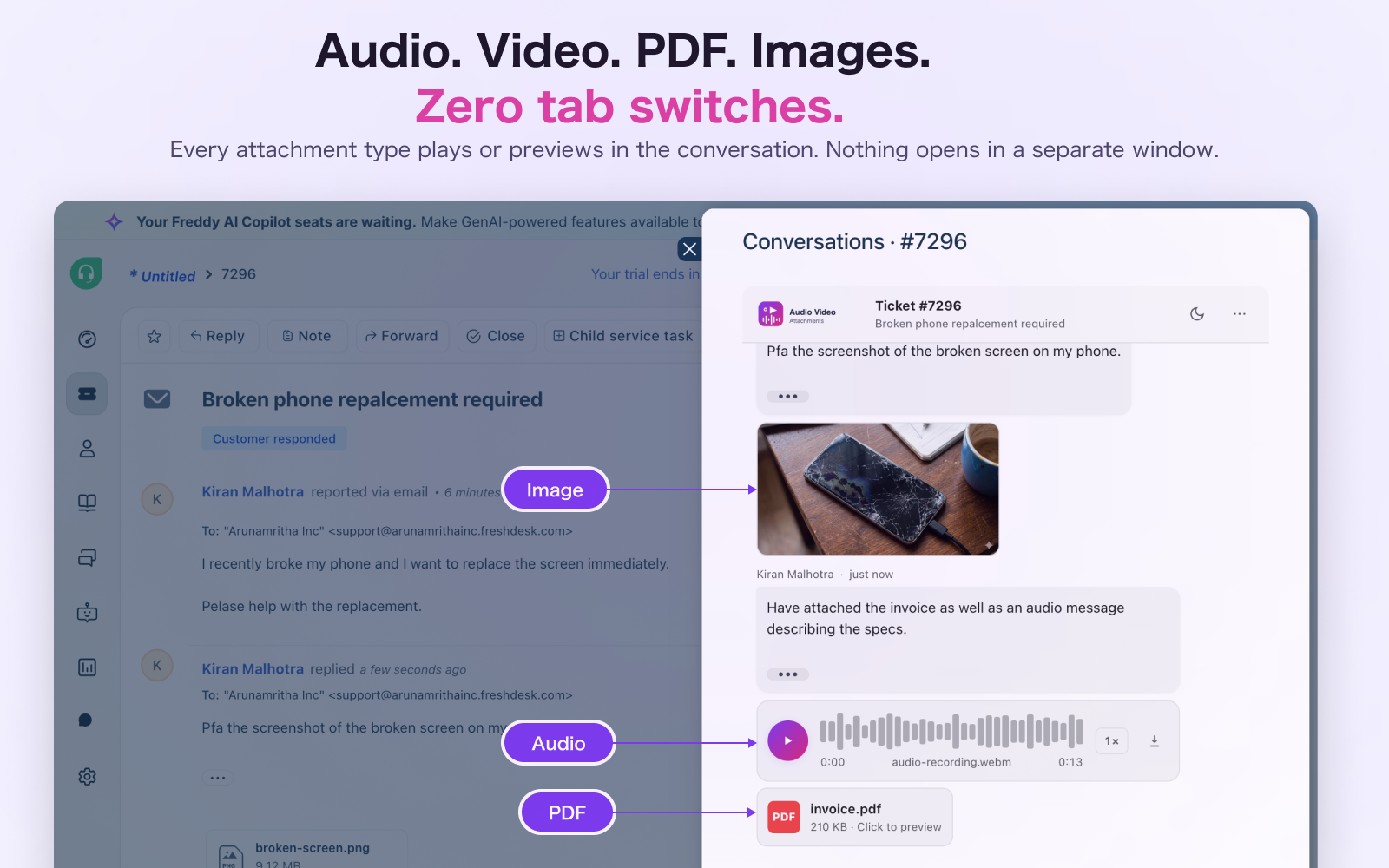
Audio. Video. PDF. Images. All inline. Zero tab switches.
Every attachment type has its own player right in the conversation thread. Waveform audio player with speed control. Video player with scrubber, PiP, and fullscreen. PDF tiles that open in a full-screen preview. Images in a lightbox with keyboard navigation. No grey links, no downloads, no leaving Freshdesk.
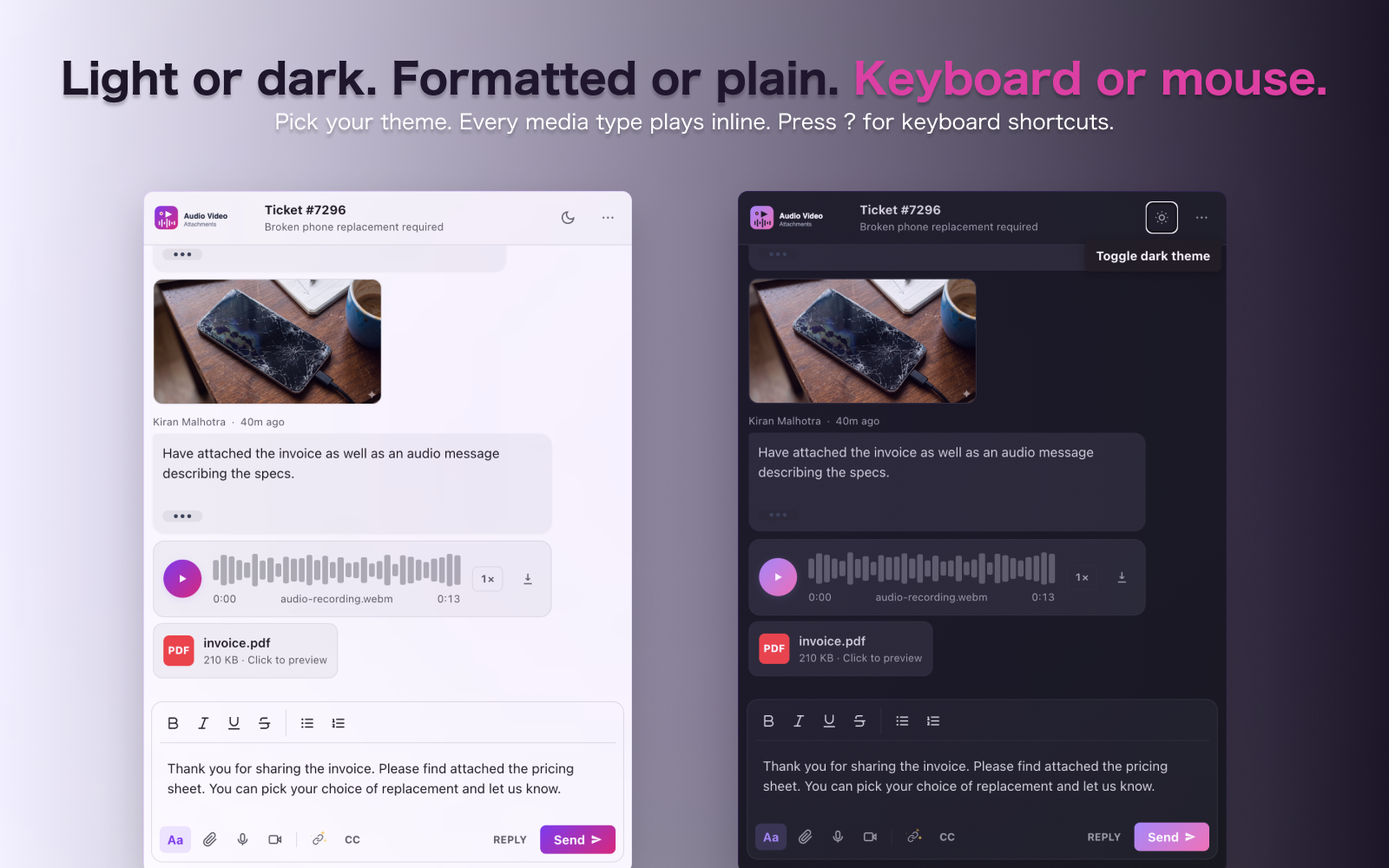
Light or dark. Keyboard or mouse. Polished either way.
Toggle between light and dark mode — the theme is saved per agent and restored automatically. Navigate the conversation with J/K, jump to compose with C, start recording with A or V. Every control has a tooltip. Every dialog traps focus. Built to WCAG 2.1 AA so your whole team can use it.
Built to the last detail
Magic Links
Request a recording from any customer in one click. They record in-browser — no app, no account. The media lands as an inline player in the ticket automatically.
Inline, Not a Link
Customer recordings arrive as a private bot note with a full inline player. Watch, scrub, download — without leaving the ticket thread.
Magic Link Attribution
The Magic Link log tracks every request: Pending, Expired, or Received. When media arrives, a single click scrolls to the exact message in the thread.
Secure & Single-Use
Links expire after the validity window (1–24 hours, configurable). Each link is single-use — marked complete after the first upload. UUID tokens with 122 bits of entropy.
UBAC
Each agent authenticates with their own Freshdesk API token, AES-encrypted with a personal password. Replies come from them — not the admin account.
Custom Media Players
Branded audio and video players with waveform progress, speed control (0.5×–2×), Picture-in-Picture, fullscreen, and download — no native browser controls.
Reply & Note Mode
Toggle between a customer-visible reply and a private internal note in one click — right in the composer, without navigating away.
Keyboard Shortcuts
Navigate with J/K, jump to top with GG, focus the composer with C, start recording with A or V. Press ? for the full shortcut reference.
Built on trust. Open to your whole team.
Enterprise-grade security without friction. And collaboration that reaches every stakeholder — no extra licenses, no new logins.
Security
Single-use links
Each magic link can be submitted exactly once. The moment a customer uploads, the session is marked complete — the same link can't be reused.
122-bit entropy tokens
Session tokens are UUID v4 — 122 bits of randomness. Unguessable by brute force. No sequential IDs, no predictable patterns.
Server-enforced expiry
Link validity (1–24 hours) is checked server-side against Azure Table Storage — not controlled by the client. A customer can't extend a link by manipulating the URL.
Direct-to-blob upload
Files go straight from the customer's browser to Azure Blob Storage via a scoped, write-only SAS token that expires in 15 minutes. They never pass through your server.
Credentials never exposed
Your Freshdesk domain and admin API token are stored only in Azure Table Storage. They are never included in any response sent to the customer's browser.
CORS-locked endpoints
The upload and completion endpoints only accept requests from taroo.in. No third-party site or script can trigger an upload against an active session token.
Simple pricing
Start free, pay when you're ready.
Free Trial
Full access to all features — including Magic Links — for 21 days. No credit card required.
Paid
Per-agent pricing. Install from the Freshdesk Marketplace and your team is ready in minutes.
The full picture
Audio Video Attachments turns your Freshdesk sidebar into a media-first workspace — with Magic Links as the centrepiece.
Magic Links let you request a recording from any customer in one click. Hit the 🔗 button in the composer, type an optional prompt, and generate. A pre-written reply goes to the customer with the secure link. They open it in any browser — no app, no login, no download — record audio, video, or a screen capture, and submit. The recording arrives as a private bot note in the ticket with a full inline player. Scrubber, speed control, Picture-in-Picture. All right in the thread.
No more “can you describe the issue?” No more “View Recording” links that open on someone else’s site. The customer shows you the problem. It lands in your ticket. You watch it without leaving Freshdesk.
What makes it different from Screendesk and similar tools? Those tools deliver a hyperlink in a reply. You click it, leave Freshdesk, watch it on their site, come back, take notes. AVA delivers a player — inside the ticket thread, automatically, as a private bot note. You never leave.
The full conversation view surfaces every attachment from every reply — images as thumbnails, audio with a waveform player, video in a branded player, PDFs in a full-screen preview. Agents can record a voice note or video reply from inside the sidebar. UBAC means every reply comes from the right agent — not the admin account.
Ready to try Audio Video Attachments?
21-day free trial. No credit card required. Install directly from the Freshworks Marketplace.
Install Free on Freshdesk →Have questions? We're here to help.